Looking for a Samsung Food alternative?
See how MealHuddle compares to Samsung Food — feature by feature. Honest breakdown, no spin.
Feature comparison
| Feature | MealHuddle | Samsung Food |
|---|---|---|
| Household sharing | Real-time for everyone | No |
| Ad-free experience | Yes | Premium only |
| Use your own recipes | Yes | Limited import |
| Recipe import | URL, photo, PDF + AI. Migrate from Paprika, Mealie, Plan to Eat. | URL import (unreliable) |
| Browser extension | One-click save from any recipe website | No |
| Grocery lists | Auto-generated by department, start fresh anytime, delete old lists | Auto-generated |
| Meal planning | Weekly calendar with drag-and-drop | AI weekly plans |
| AI features | Chef Mode, Surprise Me suggestions, recipe generation, receipt scanning, and 10+ more | Personalized plans |
| Live cooking sessions | Gather ingredients, check off steps, track progress, see who’s cooking in real time | No |
| Dietary filtering | 15 diets — auto-derived from ingredients | Basic preferences |
| Stability | Reliable and tested | Frequent bugs reported |
| Free tier | Free forever (no ads) | Free with ads |
| Recipe search and filtering | Search by ingredient, filter by cook time, sort by rating/popularity/A-Z | No |
| Ingredient swap | Swap any ingredient on a recipe without affecting others | No |
| Recipe favorites and ratings | Save favorites, see average household ratings on cards | No |
| Recipe collections | Named collections shared with household | No |
| Family dietary restrictions | Set per member, get warnings when planning | No |
| Kid-friendly mode | Family members can rate meals | No |
| Smart home integration | Home Assistant (any brand) | Samsung SmartThings only |
| Meal plan templates | Save and reuse | No |
| Recipe sharing | Free shareable links — no account needed | No sharing |
| Pricing | Free + optional from $3.99/mo | $6.99/mo (ads in free tier) |
| Data export | Full JSON export | No |
| Barcode scanner | Yes | No |
| Print / PDF download | Yes | No |
| Community & feedback | Track reports, vote on ideas | No |
Household sharing
Ad-free experience
Use your own recipes
Recipe import
Browser extension
Grocery lists
Meal planning
AI features
Live cooking sessions
Dietary filtering
Stability
Free tier
Recipe search and filtering
Ingredient swap
Recipe favorites and ratings
Recipe collections
Family dietary restrictions
Kid-friendly mode
Smart home integration
Meal plan templates
Recipe sharing
Pricing
Data export
Barcode scanner
Print / PDF download
Community & feedback
Why households switch to MealHuddle
No ads, ever
MealHuddle's free tier is genuinely free — no ads, no upsell banners interrupting your cooking. Upgrade only if you want Pro features.
Your recipes come first
MealHuddle is built around the recipes YOU cook. Import reliably from URLs, photos, and PDFs — don't fight with a broken importer.
Works with any smart home
MealHuddle's Home Assistant integration works with any smart home setup — not just Samsung appliances. Add meals and grocery items by voice through any HA-connected speaker.
Built for households
Everyone in your home gets their own account. Collaborate on meal plans, share grocery lists, and let kids rate their favorite meals — Samsung Food is single-user only.
Where Samsung Food shines
We believe in honest comparisons. Here's what Samsung Food does well.
- Massive library of 240,000+ recipes for discovery and inspiration
- Smart Cooking Mode with hands-free step-by-step instructions
- Samsung's resources mean continued investment and development
- Smart appliance integration is unique (if you have Samsung hardware)
What Samsung Food users say
Common feedback from real users across app stores, Reddit, and forums.
“The free tier is full of ads and upsells that interrupt the cooking experience”
“Frequent bugs and crashes — especially when editing or saving recipes”
“Importing your own recipes is unreliable and often requires manual fixes”
“Feels like a Samsung product first, cooking app second — heavy branding”
“No household sharing — your partner can't access your plans without picking up your phone”
“Premium features are expensive for what you get”
“Recipe library is huge but quality varies wildly”
“Smart appliance features only work with Samsung hardware”
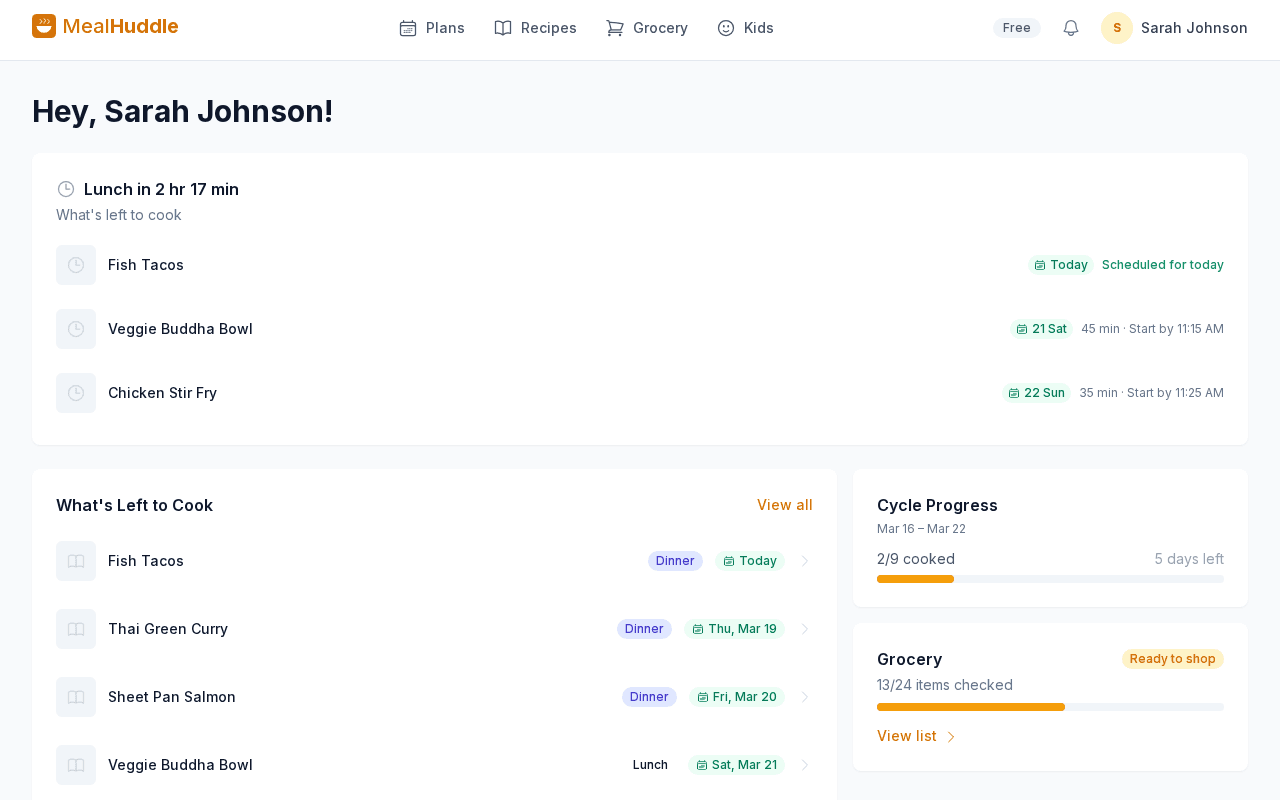
See MealHuddle in action
A real look at what meal planning looks like with MealHuddle.
Frequently asked questions
- Is MealHuddle ad-free?
- Yes — completely. MealHuddle's free tier has no ads, no upsell banners, and no interruptions. Samsung Food's free tier is ad-supported.
- Does MealHuddle work with non-Samsung smart home devices?
- Yes. MealHuddle integrates with Home Assistant, which works with thousands of smart home brands. Samsung Food's smart features only work with Samsung appliances.
- Can I import my own recipes reliably?
- Yes. MealHuddle imports from URLs, photos, and PDFs with smart extraction that works consistently. Samsung Food's import is often reported as unreliable.
- Can my household plan meals together?
- Yes. Everyone gets their own account with shared recipes, meal plans, and grocery lists — all synced in real time. Samsung Food is single-user only.
Ready to switch?
MealHuddle is free for your whole household. Set up in under a minute and start planning meals together.
More comparisons
vs Paprika
Compare MealHuddle vs Paprika Recipe Manager. Real-time household sharing, AI recipe import, and a free tier — everything Paprika is missing.
vs Mealime
Compare MealHuddle vs Mealime. Use your own recipes, share plans with your household, and plan any meal — not just weeknight dinners.
vs Plan to Eat
Compare MealHuddle vs Plan to Eat. Get a free tier, AI-powered recipe import, and real household accounts — not a shared login.
vs AnyList
Compare MealHuddle vs AnyList. Get AI-powered features, better meal planning, and full data portability — all with real-time household sharing.
vs Mealie
Compare MealHuddle vs Mealie. Get a hosted solution with real-time collaboration, AI features, and no Docker required.