Looking for a Mealime alternative?
See how MealHuddle compares to Mealime Meal Plans & Recipes — feature by feature. Honest breakdown, no spin.
Feature comparison
| Feature | MealHuddle | Mealime |
|---|---|---|
| Use your own recipes | Yes | No |
| Household sharing | Real-time for everyone | No |
| Meal planning | Weekly calendar with drag-and-drop | Weekly dinner suggestions |
| Recipe import | URL, photo, PDF + AI. Migrate from Paprika, Mealie, Plan to Eat. | No |
| Browser extension | One-click save from any recipe website | No |
| Grocery lists | Auto-generated by department, start fresh anytime, delete old lists | Auto-generated (basic) |
| Serving sizes | Any number | 2, 4, or 6 only |
| Dietary filtering | 15 diets — auto-derived from ingredients | Built-in filters (strong) |
| Meal plan templates | Save and reuse | No |
| AI features | Chef Mode, Surprise Me suggestions, recipe generation, receipt scanning, and 10+ more | Meal suggestions |
| Live cooking sessions | Gather ingredients, check off steps, track progress, see who’s cooking in real time | No |
| Free tier | Free forever (core features) | Limited free tier |
| Recipe search and filtering | Search by ingredient, filter by cook time, sort by rating/popularity/A-Z | No |
| Ingredient swap | Swap any ingredient on a recipe without affecting others | No |
| Recipe favorites and ratings | Save favorites, see average household ratings on cards | No |
| Recipe collections | Named collections shared with household | No |
| Family dietary restrictions | Set per member, get warnings when planning | No |
| Kid-friendly mode | Family members can rate meals | No |
| Web access | Works in any browser | No web app |
| Smart home integration | Home Assistant built-in | No |
| Recipe sharing | Free shareable links — no account needed | No sharing |
| Data export | Full JSON export | No |
| Barcode scanner | Yes | No |
| Print / PDF download | Yes | No |
| Community & feedback | Track reports, vote on ideas | No |
Use your own recipes
Household sharing
Meal planning
Recipe import
Browser extension
Grocery lists
Serving sizes
Dietary filtering
Meal plan templates
AI features
Live cooking sessions
Free tier
Recipe search and filtering
Ingredient swap
Recipe favorites and ratings
Recipe collections
Family dietary restrictions
Kid-friendly mode
Web access
Smart home integration
Recipe sharing
Data export
Barcode scanner
Print / PDF download
Community & feedback
Why households switch to MealHuddle
Your recipes, your way
MealHuddle is built around YOUR recipe collection. Import from anywhere — URLs, photos, PDFs — or add recipes by hand. You're never limited to someone else's library.
Real meal planning
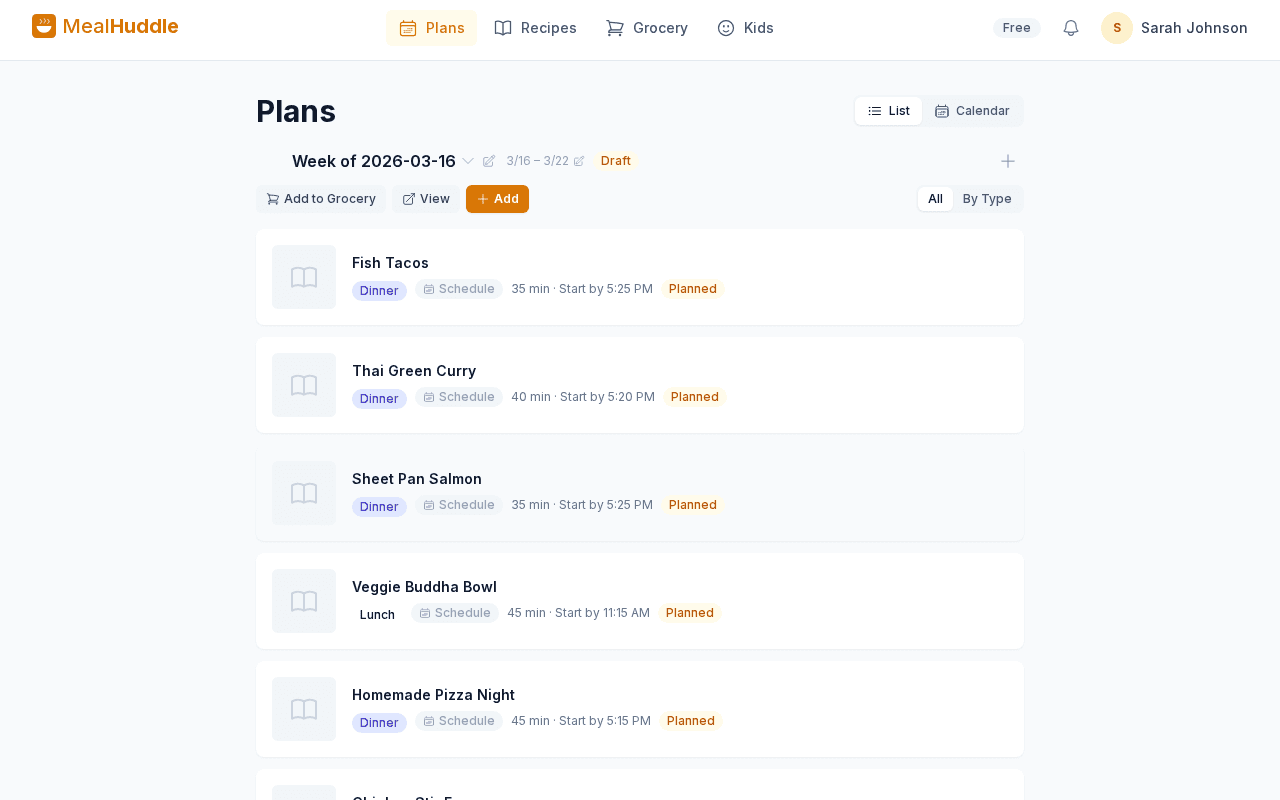
Plan breakfast, lunch, dinner, and snacks on a full calendar. Schedule meals for specific days, drag them around, and see your whole week at a glance.
Share with your household
Everyone in your home gets their own account. See each other's additions in real time, collaborate on grocery lists, and let kids rate meals they loved.
Flexible for any household
No rigid serving sizes. Plan for any number of people, adjust portions however you need, and cook what works for your family — not what an algorithm picked.
Where Mealime shines
We believe in honest comparisons. Here's what Mealime does well.
- Zero-effort meal planning — set dietary preferences and get a plan instantly
- Great for beginners who want to cook more without recipe overload
- Strong dietary filter support (keto, vegan, paleo, etc.)
- Grocery delivery integrations (Instacart, Walmart)
What Mealime users say
Common feedback from real users across app stores, Reddit, and forums.
“You can't add or import your own recipes — you're stuck with Mealime's library”
“Meal suggestions get repetitive after a few weeks”
“No way to share meal plans with your partner or family — they can't add meals or even see the plan”
“Serving sizes are limited to 2, 4, or 6 — no flexibility”
“It's not a real meal planner — no calendar view, no scheduling multiple meals per day”
“No web app — only works on your phone”
“Dietary filters are good but the recipe variety within each category is narrow”
“No grocery list customization or department organization”
See MealHuddle in action
A real look at what meal planning looks like with MealHuddle.
Frequently asked questions
- Can I use my own recipes with MealHuddle?
- Yes! MealHuddle is built around your recipes. Import from URLs, photos, or PDFs, or add them by hand. Unlike Mealime, you're never limited to a pre-built library.
- Can my partner see and edit the meal plan?
- Yes. Everyone in your household gets their own account and can add meals, edit the plan, and check off grocery items — all synced in real time.
- Does MealHuddle have a web app?
- Yes. MealHuddle works in any browser on any device. No app store download required — just sign up and start planning.
- Can I plan more than just dinners?
- Yes. MealHuddle lets you plan breakfast, lunch, dinner, and snacks on a full weekly calendar. Schedule any meal for any day and drag to rearrange.
Ready to switch?
MealHuddle is free for your whole household. Set up in under a minute and start planning meals together.
More comparisons
vs Paprika
Compare MealHuddle vs Paprika Recipe Manager. Real-time household sharing, AI recipe import, and a free tier — everything Paprika is missing.
vs Plan to Eat
Compare MealHuddle vs Plan to Eat. Get a free tier, AI-powered recipe import, and real household accounts — not a shared login.
vs AnyList
Compare MealHuddle vs AnyList. Get AI-powered features, better meal planning, and full data portability — all with real-time household sharing.
vs Mealie
Compare MealHuddle vs Mealie. Get a hosted solution with real-time collaboration, AI features, and no Docker required.
vs Samsung Food
Compare MealHuddle vs Samsung Food. No ads, bring your own recipes, and plan meals with your household — not just yourself.