If you've decided to start meal planning — or you've been doing it on paper and you're ready to upgrade — finding the best meal planning app can feel like its own project. There are dozens of options, each promising to simplify your life, and they all look great in the App Store screenshots.
But here's the thing: not every meal planning app solves the same problem. Some are built for solo fitness enthusiasts tracking macros. Others are recipe databases with a calendar bolted on. And a few are genuinely designed for the way households actually cook — multiple people, shared grocery lists, and the reality that Tuesday's dinner plan might change by Monday night.
This guide breaks down what to look for, what to avoid, and how the most popular options compare.
What Makes a Great Meal Planning App?
Before comparing specific apps, it helps to know what actually matters. After talking to hundreds of home cooks, these are the features that separate a meal planning app you'll use from one you'll delete after a week:
Shared access for the whole household. If only one person can see the meal plan, you'll spend your evenings answering "what's for dinner?" texts anyway. The best apps let everyone in the household view and contribute to the plan.
A grocery list that builds itself. Planning meals is only half the battle. If you still have to manually write out your shopping list ingredient by ingredient, the app isn't saving you much time. Look for automatic grocery list generation based on your planned meals.
Flexibility in your planning window. Not everyone plans week by week. Some families prefer biweekly or monthly cycles. A good family meal planning app lets you choose what works for your rhythm — not the other way around.
Your own recipe library. You want to build up a collection of meals your household actually eats, not just browse someone else's database. The ability to save, organize, and reuse your own recipes is essential.
Simplicity. If the app requires a tutorial or feels like project management software, you won't use it. The best meal prep app is the one that's fast enough to use on a Tuesday morning before work.
Features That Sound Good but Don't Matter Much
Not everything on an app's feature list is equally useful. A few things that seem impressive but rarely move the needle for household cooks:
Macro tracking and calorie counting. Unless you have specific dietary goals, detailed nutrition tracking adds complexity without much benefit for everyday meal planning.
Thousands of built-in recipes. A massive recipe database sounds appealing, but most families rotate through 15–20 meals. What you need is an easy way to save your favorites, not 50,000 recipes you'll never cook.
Social features and sharing. Posting your meal plan to a community feed? That's a nice idea, but it has nothing to do with getting dinner on the table.
Meal delivery integration. Some apps blur the line between meal planning and meal kit subscriptions. If you're here to plan your own meals and shop for your own groceries, these integrations just add clutter.
How Popular Meal Planning Apps Compare
Here's an honest look at the most popular options and what they're best at.
Mealime
Best for: Solo meal preppers who want guided recipes with step-by-step instructions.
Mealime is clean, fast, and great for individuals. It generates meal plans based on your dietary preferences and builds a grocery list automatically. The recipes are well-tested and easy to follow.
The catch: It's designed for one person. If you're planning for a household with different preferences, or if you want to use your own recipes instead of theirs, it feels limiting. See our full MealHuddle vs. Mealime comparison for a detailed breakdown.
Paprika
Best for: Recipe collectors who want a powerful personal recipe manager.
Paprika excels at clipping recipes from the web, organizing them into categories, and scaling ingredients. It's been around for years and has a loyal following.
The catch: It's a recipe manager first, meal planner second. The meal planning calendar and grocery list features exist but feel like afterthoughts. There's no real household sharing — it's a single-user tool. We go deeper in our MealHuddle vs. Paprika comparison.
AnyList
Best for: Couples or roommates who primarily want a shared grocery list.
AnyList started as a grocery list app and added meal planning later. The shared list functionality is solid and intuitive, and it works well for two people coordinating shopping.
The catch: The meal planning features are basic. You can assign recipes to dates, but there's no meal planning calendar with the kind of structure that families with kids and busy schedules need. Our MealHuddle vs. AnyList comparison covers the differences in detail.
Plan to Eat
Best for: Long-time meal planners who want a drag-and-drop calendar.
Plan to Eat has a satisfying drag-and-drop interface for scheduling meals. It's been around since 2008 and has a mature feature set. Recipe importing from websites works well.
The catch: The design feels dated, and it's a paid-only app with no free tier. Household sharing requires a separate subscription for each person, which adds up. See our MealHuddle vs. Plan to Eat comparison for a side-by-side feature breakdown.
MealHuddle
Best for: Households and families who plan and cook together.
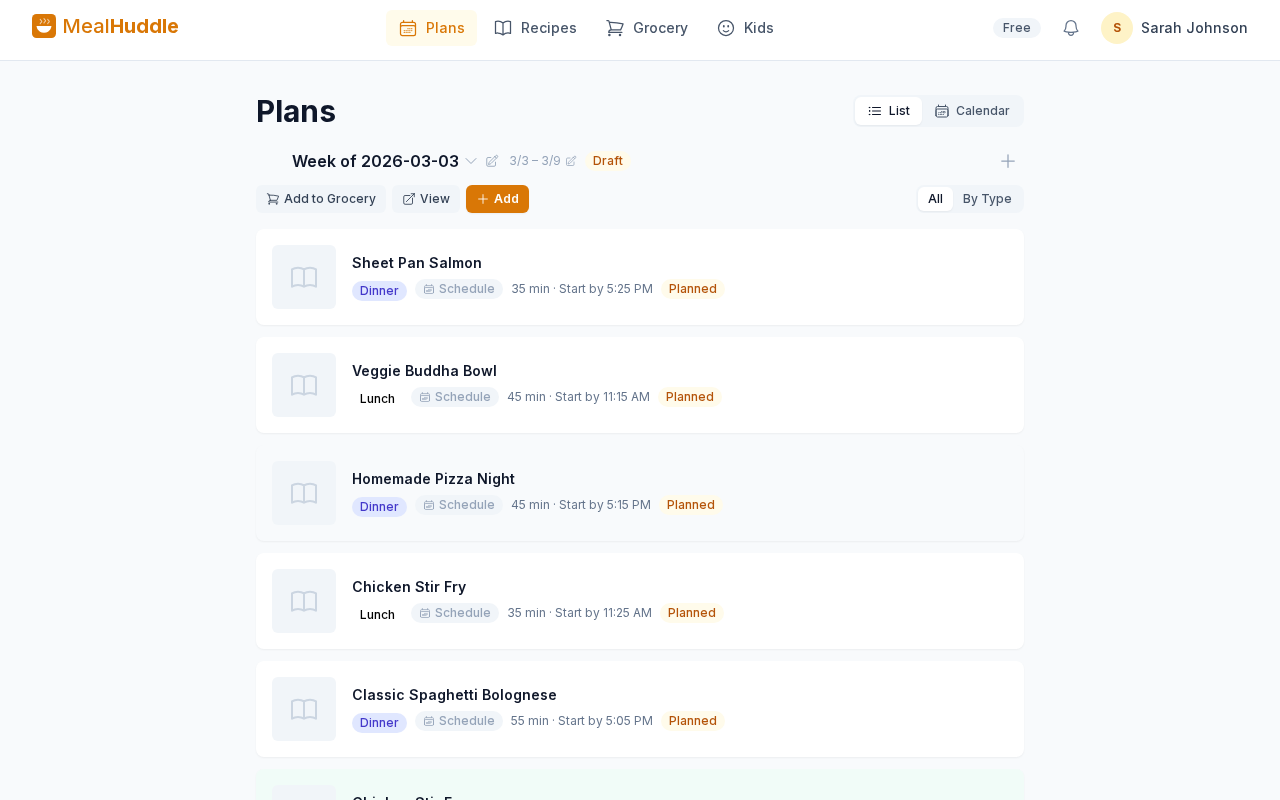
MealHuddle is built specifically for household meal planning — not individual fitness tracking or recipe browsing. Every household member can view the plan, add meals, and check off grocery items in real time. Grocery lists generate automatically from your planned meals, organized by store department. It supports flexible planning cycles (weekly, biweekly, or monthly), and importing recipes is as easy as pasting a URL or snapping a photo.
What stands out: It's genuinely designed for multiple people sharing a kitchen. The real-time sync means one person can add a meal while another is at the store checking off groceries. Pro subscribers get additional features like Chef Mode with voice Q&A, receipt scanning, recipe generation from descriptions, and cook method conversion.
How to Choose the Right One for You
The right meal planning app depends on your situation. Here's a quick decision framework:
If you cook solo and want guided recipes: Mealime is a great starting point. Simple, fast, and free.
If you're a recipe hoarder: Paprika is still the gold standard for clipping and organizing recipes from around the web.
If you just need a shared grocery list: AnyList does that well without overcomplicating things.
If you plan meals as a household: Look for an app that treats the household — not the individual — as the core unit. Shared plans, shared grocery lists, and the ability for everyone to contribute.
What About Spreadsheets and Notebooks?
Plenty of people plan meals successfully with a whiteboard on the fridge, a notebook, or a Google Sheet. There's nothing wrong with that. If your system works and you're consistent with it, don't fix what isn't broken.
But if you find yourself:
- Forgetting items at the store because your list was on the fridge
- Spending 20 minutes writing out grocery lists by hand
- Struggling to coordinate with a partner or household members
- Losing track of recipes you've tried and loved
...then an app genuinely saves time. The best meal prep app isn't the one with the most features — it's the one that removes enough friction to keep you planning week after week. We also explored the cookbooks vs. apps debate if you're deciding whether you even need an app in the first place.
The Bottom Line
Meal planning apps are tools, not magic. None of them will plan your meals for you (well, some are getting close). But the right one removes the friction between "I should meal plan" and actually doing it.
If you're cooking for a household and want something built for that — shared plans, automatic grocery lists, recipe importing, and real-time collaboration — give MealHuddle a try. It's free to start, and you can have your first week planned in about 10 minutes.